About
About User Manual
Getting Started
Login to the madCMS Administration Console
Your website is administered through a browser-based Administraion Console. Usually, there is a convenient link to the console in the footer of your website. The direct URL of the console should be "http://www.yoursitename/madcms".
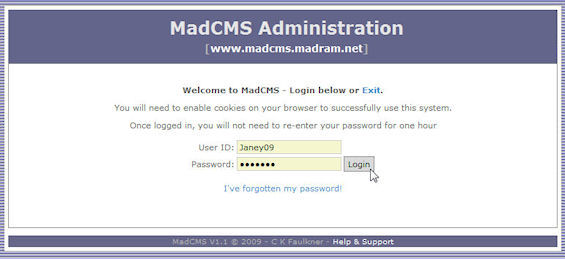
Login to the Adminstration Console. Remember, your User ID and Password are case-sensitive and some letters may actually be numbers (lower-case L may be the number 1 and zeros may be used for lower or upper-case O).
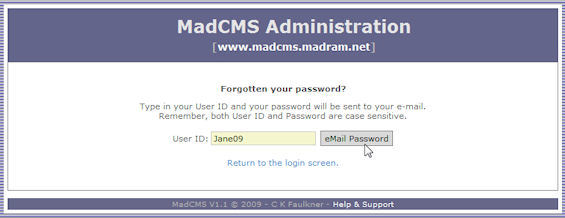
Forgotten your Password?
No problem. Just click on the "I've forgotten my password" link. Enter your User ID (yes, you will need to remember at least that) and your Password will be sent to the e-mail address nominated when your website was set up.
Successful Login
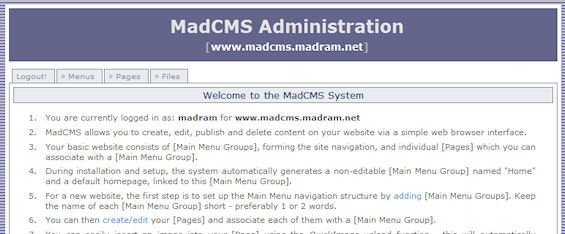
Once you are sucessfully logged-in, you will be presented with the homepage of the Administration Console. You may see different tabs to those shown on the screen-capture below, depending on what functionality has been configured for your website. The minimum tabs you will see are the "Menus" and "Pages" tabs.
Link to Your Live Website
The address of your live website appears as a link in the banner of the madCMS Administration Screen. You can view your site simply by clicking on this link.

Creating your Website
Assuming you are familiar with the basic concepts of madCMS and have done your site planning, lets get started on creating your website.
Generally, it's most effective to build your site in this order:
- Set up Main Menu Groups
- Create individual Pages (focus on the content of the Pages)
- Create any files and upload/link them into Pages
Thoughts...
Anybody remotely interesting is mad, in some way or another. (Dr Who)